
𝗔𝗜-𝗣𝗼𝘄𝗲𝗿𝗲𝗱 𝗠𝗮𝘁𝗰𝗵𝗶𝗻𝗴 𝗦𝗰𝗼𝗿𝗲𝘀 𝗳𝗼𝗿 𝗝𝗼𝗯 𝗔𝗽𝗽𝗹𝗶𝗰𝗮𝘁𝗶𝗼𝗻𝘀!
If you are using Oracle Recruiting, here’s a cool way to shortlist candidates faster and smarter.
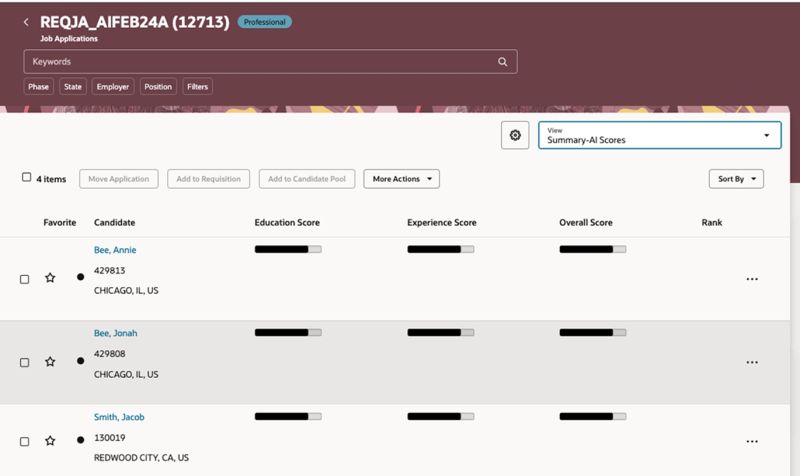
Oracle has introduced Generative AI-based Matching Scores to show how well a candidate fits a job based on: Education, Experience, Skills, Profile.
𝗛𝗼𝘄 𝗶𝘁 𝘄𝗼𝗿𝗸𝘀:
You can now add a new “Applicant Ratings” section in your Job Applications grid view to see 4 columns:
✔️ Education Rating
✔️ Experience Rating
✔️ Profile Rating
✔️ Skill Rating
You will then see scores (0 to 5) with helpful bar displays that give a quick visual of how strong a match the candidate is.
🛠️ 𝗦𝘁𝗲𝗽𝘀 𝘁𝗼 𝘂𝘀𝗲:
Select one or more job applications.
Use the new “Calculate Candidate Matching Rating” action.
It’s asynchronous, so AI does the work behind the scenes.
𝗥𝗲𝗳𝗿𝗲𝘀𝗵 𝘆𝗼𝘂𝗿 𝗴𝗿𝗶𝗱 𝘁𝗼 𝗰𝗵𝗲𝗰𝗸 𝘁𝗵𝗲 𝘀𝘁𝗮𝘁𝘂𝘀:
✅ Scoring in progress
❌ Not scored
⚠️ No data for scoring
Once done, scores are sent back and displayed in your view.
✨ 𝗕𝗼𝗻𝘂𝘀 𝗧𝗶𝗽:
If your admin has added this action to a Candidate Selection Process, the score calculation can happen automatically when a candidate moves to a specific phase/state. Super useful!
🔓 𝗧𝗼 𝗲𝗻𝗮𝗯𝗹𝗲 𝘁𝗵𝗶𝘀 𝗳𝗲𝗮𝘁𝘂𝗿𝗲:
Ask your admin to: (It’s disabled by default)
Set ORA_IRC_APPLICANT_AI_SCORES_FEATURE_ENABLED to Y
Set ORA_IRC_AUTO_COMPUTE_JA_SCORES_ON_CREATION to Y
🔧 𝗦𝗲𝘁𝘂𝗽 𝗽𝗮𝘁𝗵 𝗳𝗼𝗿 𝗮𝗱𝗺𝗶𝗻𝘀:
Setup and Maintenance → Manage Administrator Profile Values
𝗪𝗮𝗻𝘁 𝘁𝗵𝗲 𝘀𝗰𝗼𝗿𝗲𝘀 𝘁𝗼 𝗰𝗮𝗹𝗰𝘂𝗹𝗮𝘁𝗲 𝗮𝘂𝘁𝗼𝗺𝗮𝘁𝗶𝗰𝗮𝗹𝗹𝘆?
You can now add a new action called “Calculate Candidate Matching Rating” in your Candidate Selection Process. Once added, the system will automatically calculate scores when a candidate moves to that phase and state.
🛠️ 𝗛𝗲𝗿𝗲’𝘀 𝗵𝗼𝘄 𝘁𝗼 𝘀𝗲𝘁 𝗶𝘁 𝘂𝗽:
Go to Setup and Maintenance
Functional Area: Candidate Job Applications → Candidate Selection Process Configuration → Add Action → Calculate Candidate Matching Rating.
You can also set conditions using: Predefined options, Fast Formulas
That’s it! The AI scoring will now trigger automatically as candidates move through your hiring process.
This update makes screening way easier and smarte
Let’s connect
Archives
- Career Talk (7)
- Journey Journal (11)
- My Oracle Journey (7)
- Reading Corner (3)
- Leadership (45)
- Oracle (63)



 Lead with Mohana
Leave a comment