
Want to evaluate candidates more effectively and save recruiter time?
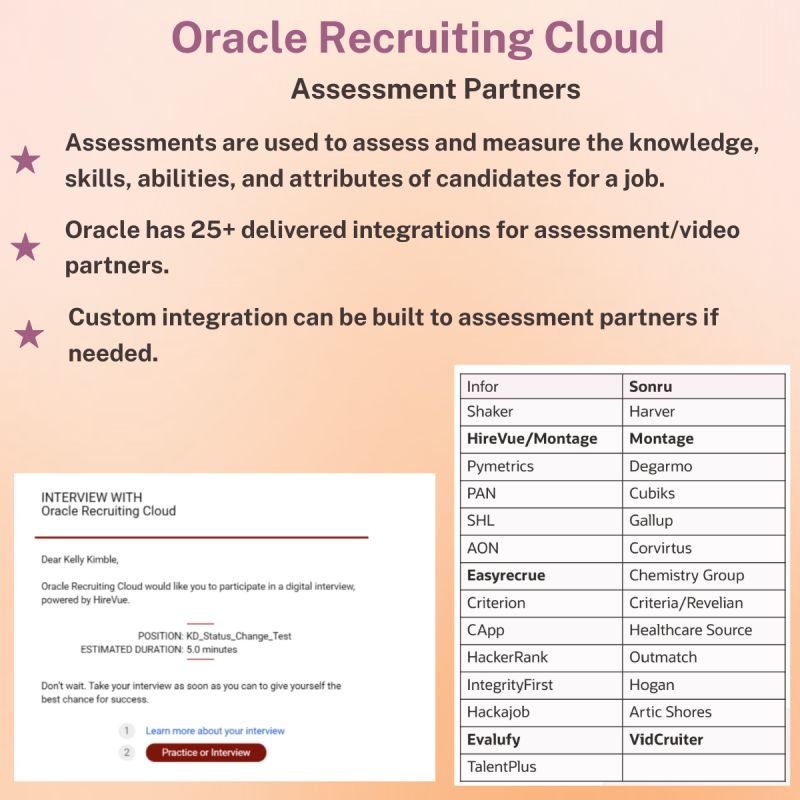
With Oracle Recruiting Cloud, you can automatically trigger assessments at specific stages of the Candidate Selection Process – no manual intervention needed.
🔹 Assessments help evaluate a candidate’s knowledge, skills, abilities, and attributes.
🔹 Use video, technical, or behavioural assessments to suit your job requirements.
🔹 Leverage 25+ pre-built integrations with leading assessment and video interview partners
🔹 Need a unique solution? Custom integrations are supported too.
𝗛𝗲𝗿𝗲’𝘀 𝗵𝗼𝘄 𝗶𝘁 𝘄𝗼𝗿𝗸𝘀:
First, enable the assessment partner, then navigate to: Setup and Maintenance > Recruiting and Candidate Experience > Candidate Job Applications > Candidate Selection Process Configuration
🔹 Choose your selection process and phase
🔹 Add the Request Assessment action at the relevant state
🔹 Define conditions using predefined rules or fast formulas
🔹 Save
Oracle Recruiting Cloud empowers you to modernize and automate hiring.
Let’s connect
Archives
- Career Talk (7)
- Journey Journal (11)
- My Oracle Journey (7)
- Reading Corner (3)
- Leadership (45)
- Oracle (63)



 Lead with Mohana
Leave a comment