
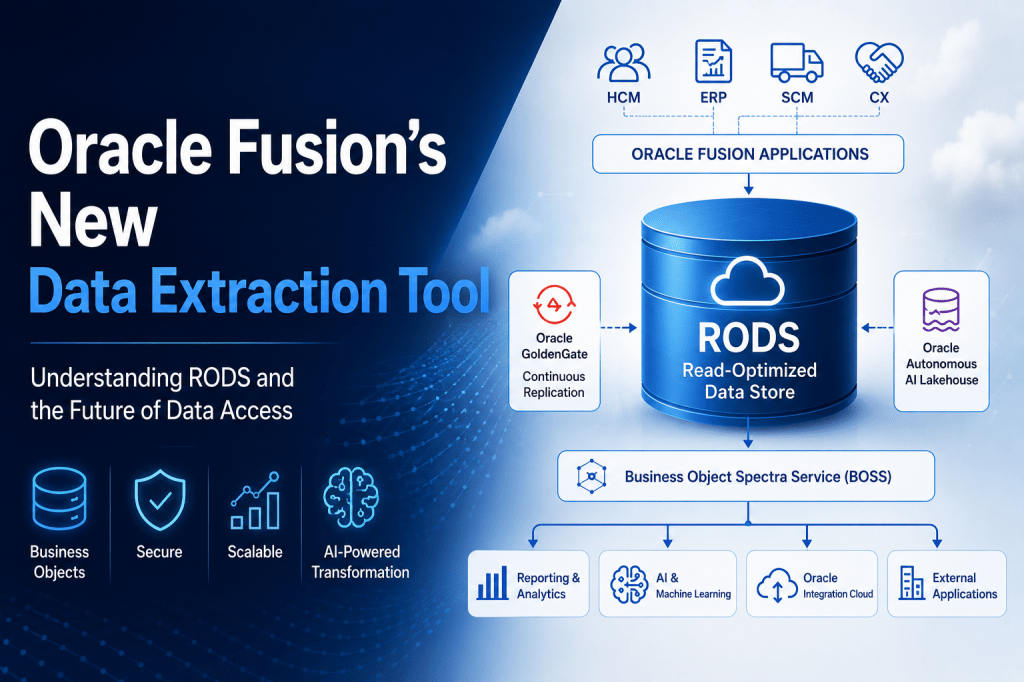
Every Oracle Fusion implementation, regardless of industry or size, eventually arrives at the same requirement:
“How do we efficiently get data out of Fusion?”
Whether it’s powering executive dashboards, feeding enterprise data warehouses, synchronising third-party applications, enabling AI models, or supporting operational reporting, data extraction is a fundamental part of every Oracle Fusion ecosystem.
Over the years, Oracle has provided several mechanisms to support these requirements. Business Intelligence Cloud Connector (BICC) became the preferred choice for scheduled bulk extraction, REST APIs enabled transactional integrations, BI Publisher (BIP) offered highly flexible SQL-based reporting, and OTBI served interactive business analytics.
Each of these technologies addressed specific use cases and continues to play an important role today.
However, as organisations increasingly adopt AI, advanced analytics, cloud integrations, enterprise data platforms and near real-time reporting, the demands placed on Oracle Fusion have changed significantly. Data is no longer consumed only by business users—it is continuously flowing into enterprise applications, integration platforms, data lakes, AI services and reporting tools.
These evolving requirements exposed a challenge that many organisations have experienced for years.
How do you support high-volume reporting and integrations without impacting the performance of your transactional applications?
Oracle’s answer is the Read-Optimized Data Store (RODS) and the new Data Extraction Tool.
While many people see it as another Redwood application introduced in recent releases, I believe it represents something much bigger.
It signals Oracle’s move towards a modern data architecture where transaction processing and data consumption are treated as two independent workloads.
How We’ve Traditionally Extracted Data from Oracle Fusion
Before understanding why Oracle introduced RODS, it’s worth looking at how data extraction has traditionally worked in Oracle Fusion Cloud.
Business Intelligence Cloud Connector (BICC)
For many customers, BICC has been the primary solution for moving large volumes of data out of Oracle Fusion.
It allows organisations to:
- Perform scheduled bulk data extraction
- Export business objects for reporting and analytics
- Support incremental data loads
- Feed enterprise data warehouses and downstream systems
BICC has proven to be reliable and remains widely used today.
However, it was designed primarily for batch-based extraction rather than modern integration scenarios requiring greater flexibility or near real-time access.
REST APIs
REST APIs addressed a completely different requirement.
Rather than extracting millions of records, REST services enable applications to retrieve or update specific business transactions in near real time.
Examples include:
- Creating or updating employees
- Retrieving purchase orders
- Managing suppliers
- Creating sales orders
- Updating invoices
REST APIs remain the recommended approach for transactional integrations.
However, they aren’t designed for high-volume extraction or analytical workloads. Retrieving millions of records through REST APIs is possible, but far from efficient.
BI Publisher (BIP)
BI Publisher gradually evolved beyond its original purpose.
Although designed as a reporting solution, many organisations began using BI Publisher as an integration engine because of one key advantage:
Complete flexibility.
Developers could write custom SQL, join multiple tables, apply complex filters and generate output exactly in the format required by downstream systems.
This made BI Publisher extremely powerful.
Over time, countless enterprise integrations came to depend on SQL queries written within BI Publisher.
But that flexibility also came at a cost.
Large SQL queries executed directly against Fusion’s reporting schema.
High-volume integrations increased the load on reporting infrastructure.
Custom SQL became tightly coupled to Oracle’s underlying database model, making upgrades and ongoing maintenance more challenging.
As reporting and integration workloads grew, transactional applications were increasingly expected to support analytical workloads as well.
The Challenge Oracle Needed to Solve
Let’s consider a typical global organisation running Oracle Fusion HCM and ERP.
Every day, data needs to be extracted for multiple purposes:
- Executive dashboards
- Enterprise reporting
- Payroll interfaces
- Third-party applications
- Data warehouses
- Data lakes
- AI and machine learning platforms
- Regulatory reporting
- Oracle Integration Cloud workflows
At the same time, employees continue to hire candidates, managers approve transactions, finance teams process invoices, procurement creates purchase orders, and payroll runs critical business processes.
Both operational transactions and reporting workloads are competing for the same underlying system.
This creates a fundamental architectural challenge.
Transactional databases are designed to process thousands of business transactions quickly and consistently.
Analytical workloads, on the other hand, involve reading very large volumes of data.
Trying to optimise a single environment for both types of workloads inevitably creates compromises.
As organisations adopted AI, predictive analytics and enterprise data platforms, this challenge became even more significant.
Oracle recognised that the traditional approach to data extraction needed to evolve.
Oracle’s Answer: Read-Optimized Data Store (RODS)
Rather than allowing every reporting tool or integration to query Fusion directly, Oracle introduced the Read-Optimized Data Store (RODS).
RODS is a continuously synchronised copy of Oracle Fusion business data, specifically designed for read-intensive workloads.
Instead of extracting information from the transactional database, reporting, analytics and integration workloads access data from this dedicated read-optimized environment.
Oracle continuously replicates transactional data into RODS using Oracle GoldenGate, while Oracle Autonomous AI Lakehouse provides the underlying data platform.
This architectural separation delivers an important benefit.
Transactional systems continue to focus on processing business operations, while reporting, analytics, integrations and AI workloads consume data from a dedicated environment optimised for high-volume read operations.
In simple terms, Oracle is separating where data is created from where data is consumed.

Introducing the Data Extraction Tool
The Data Extraction Tool is Oracle Fusion’s next-generation platform for bulk data extraction.
Unlike BICC, which primarily runs as a background extraction utility, Oracle has built this as a modern Redwood application that enables users to define, schedule and monitor extracts through a simple and intuitive interface.
Before You Can Use It
The Data Extraction Tool is not enabled by default.
Oracle requires administrators to complete a few setup activities before the feature becomes available.
These include:
- Enabling the Redwood feature through Setup and Maintenance
- Raising a Service Request (SR) with Oracle to activate the backend service
- Configuring the required profile options
- Assigning the necessary security roles
- Granting access to authorised users
Refer to this to understand how to set this up in HCM – Extract Data from HCM Read-optimized Data Store
Rather than navigating multiple configuration pages or managing background utilities, everything is organised within a clean Redwood interface.
The application is divided into three primary workspaces:
- Extract Definitions
- Extract Schedules
- Extract Jobs
Each focuses on a different stage of the extraction lifecycle.
Extract Definitions
Think of an Extract Definition as the blueprint for your extraction.
Instead of writing SQL queries, you simply define:
- Which Business Objects you want
- Which attributes should be included
- Output format
- Filters
- Extraction type
Once created, the definition becomes reusable.
Multiple schedules can reference the same definition, making ongoing maintenance significantly easier.
For organisations managing dozens—or even hundreds—of integrations, this introduces much better standardisation.
Extract Schedules
Once an Extract Definition has been created, Oracle makes scheduling extremely straightforward.
Users can choose to:
- Execute immediately
- Schedule one-time extracts
- Configure recurring executions
- Automate enterprise data movement
This removes much of the operational overhead associated with traditional extraction processes.
Rather than maintaining external schedulers or custom scripts, scheduling becomes part of the platform itself.
Extract Jobs
The third workspace provides operational visibility.
Every extraction that runs is automatically recorded.
Administrators can monitor:
- Running jobs
- Completed jobs
- Failed jobs
- Processing status
- Row counts
- Output files
- Execution history
For support teams, this makes troubleshooting considerably easier than previous approaches.
Creating Your First Extract
One aspect I particularly like is how Oracle has simplified the extraction process.
Instead of building SQL queries or configuring complex BICC jobs, creating an extract follows a logical sequence.
Step 1
Create an Extract Definition.
Step 2
Choose the output format.
Currently supported formats include:
- CSV
- JSON
Step 3
Select the required Business Objects.
For example:
- Workers
- Jobs
- Assignments
- Sales Orders
- Suppliers
- Purchase Orders
- Inventory Transactions
Step 4
Choose the attributes you actually require.
Rather than extracting every available column, Oracle encourages selecting only the fields needed by downstream systems.
Step 5
Apply filters.
Filtering reduces extraction volume and improves overall performance.
Step 6
Save the definition.
Step 7
Execute immediately or schedule for later.
The overall experience feels far more intuitive than previous extraction approaches.
AI-Powered Query Transformation and Hands-on Walkthrough
One of the most innovative capabilities introduced alongside Oracle’s new Data Extraction Tool is the Data Extraction Query Transformer Agent.
While the Data Extraction Tool and RODS provide a new way of extracting business data, Oracle also recognised another challenge.
Many Oracle Fusion customers have spent years building BI Publisher reports and custom SQL queries for reporting and enterprise integrations. Some organisations have hundreds of reports, while others have thousands of lines of SQL that power critical business processes.
Rewriting all of those queries manually into Oracle’s new Business Query Language (BQL) would be both time-consuming and costly.
Oracle’s answer is AI.
The Data Extraction Query Transformer Agent uses Oracle AI Agent Studio to analyse existing SQL statements and automatically generate equivalent Business Query Language (BQL) queries that can execute against the Read-Optimized Data Store (RODS).
Rather than replacing existing investments, Oracle is using AI to help customers modernise them.Prerequisites
Before using the Data Extraction Query Transformer Agent, ensure the following prerequisites are completed:
- AI Agent Studio is enabled in your Oracle Fusion environment.
- The required security roles have been assigned.
- The appropriate profile options are configured.
- The ORA_RCS_SUPPLY_CHAIN_INTEGRATION_SPECIALIST_JOB role is granted to the user.
- Oracle AI Agent Studio is available in your environment.
These configurations ensure users have the necessary permissions to access and publish AI agents.
From the Oracle Fusion home page, navigate to:
Home → Tools → AI Agent Studio
AI Agent Studio provides Oracle’s library of prebuilt AI agents that support various business functions.
One of these is the Data Extraction Query Transformer Agent.

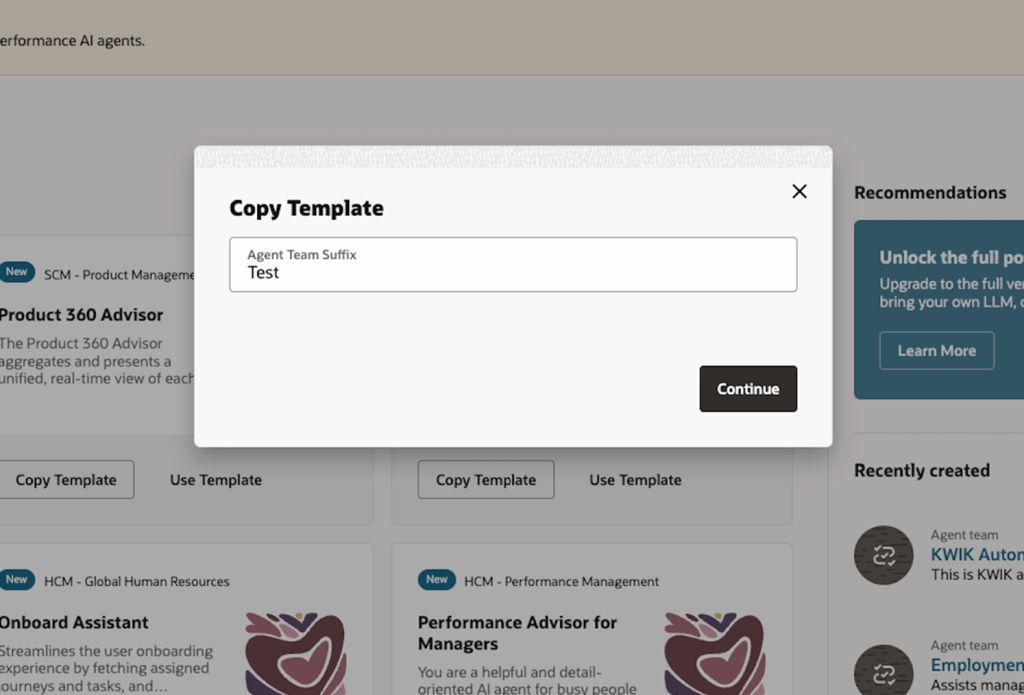
Instead of creating an AI agent from scratch, administrators simply create a copy of Oracle’s template.
Select:
Copy Template
Provide a meaningful suffix that identifies your implementation.
For example:
- Production
- Test
- DEV
- Customer Name
This creates a separate version that you can customise without modifying Oracle’s delivered template.
After the copy has been created, review the configuration and select:
Publish
Publishing makes the AI Agent available within your Fusion environment.Once published, the agent becomes available for authorised users.
Navigate to:
Me → Show More → AI Agent Studio
From here you can launch the published Query Transformer Agent.

Once the Query Transformer Agent is available, developers can provide an existing SQL statement.
The AI Agent analyses:
- SQL syntax
- Table relationships
- Join conditions
- Filters
- Business Objects
It then generates an equivalent Business Query Language (BQL) statement compatible with Oracle’s Business Object Spectra Service (BOSS).
Rather than manually rebuilding integrations, developers receive a modern Business Object-based query that can execute directly against RODS.
Best Practices
Oracle recommends several best practices when working with the Data Extraction Tool and Query Transformer:
✔ Use the Data Extraction Tool primarily for bulk extraction.
✔ Extract only the required attributes.
✔ Apply filters to reduce unnecessary processing.
✔ Break large extraction workloads into multiple scheduled jobs.
✔ Use asynchronous extraction for high-volume integrations.
✔ Continue using BI Publisher for formatted documents while adopting RODS for integration-oriented data extraction.
Following these recommendations helps improve performance and keeps extraction workloads efficient.
Current Limitations
As with any new capability, there are a few current limitations:
- Custom Objects are not yet supported.
- Analytic Views are not currently available.
- The platform is not intended for true real-time transactional access.
- Business Object coverage continues to expand with each quarterly release.
These limitations are expected to reduce as Oracle extends support across HCM, ERP, SCM and CX.







Leave a Reply