

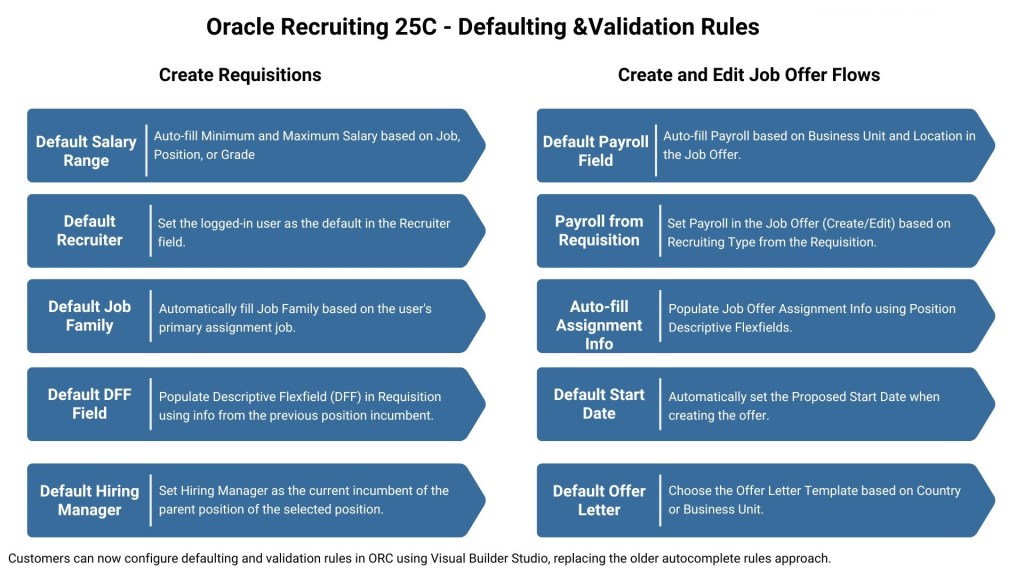
One of the most anticipated features is finally here! Defaulting and Validation Rules are now available in the Create Requisition and Create/Edit Job Offer flows in Redwood UX.
Using Business Rules in Visual Builder Studio (VBS), you can now:
✅ Default salary range from job grade
✅ Auto-populate recruiter and hiring manager fields
✅ Set currency based on location
✅ Default Payroll fields based on Business Unit, Location, or Recruiting Type
✅ Auto-fill Proposed Start Date, Position Info, Offer Letter Template, and more
This replaces the older autocomplete rule setup and offers greater flexibility and control for recruiters and hiring managers helping them work faster and smarter.
Note: Defaulting in the 25C Redwood Requisition screen doesn’t currently support User-Defined Tables (UDT) or Extensible Flexfields (EFF).
If you are using Oracle Recruiting, now’s a great time to explore how these Redwood enhancements can improve your hiring workflows.








Leave a Reply